Artificial intelligence in teaching
Following the release of ChatGPT on 30 November 2022, the academic world was thrown into turmoil. If this programme can write seminar papers and solve exams, how will we assess students in future? How will teaching change if ChatGPT simply takes over many previous tasks, such as summarising texts? The Teaching Centre regularly holds events to address these and many other questions. Keep an eye out for announcements in the newsletter and visit the website regularly to stay up to date with the latest event .
To learn how to use AI, attend the free workshops offered by the Teaching Centre and visit the AI Campus website.
Introduction
Use any Large Language Model (LLM), such as ChatGPT or Claude , to discuss a topic you are familiar with and interested in. Experiment with using AI both professionally and privately. For example, you could ask about activating teaching methods or organising a treasure hunt for a children's birthday party. Ethan Mollick suggests spending 10 hours working with AI in this way (see the link below), which will help you learn how to categorise what AI says, and when and for which tasks you can use it sensibly.
- Chatbots like ChatGPT are not like Google, so don't ask for facts; ask for inspiration instead.
- Don't just ask a question and accept the first answer; have a conversation, provide feedback, and request new ideas or revisions to previous answers.
- An LLM is a "very intelligent, very stupid assistant". Explain exactly what you want and provide contextual information.
Recommended article: Getting started with AI: Good enough prompting
In the other tabs, you will find initial prompting tips: role assignment, task, few-shot prompting with examples, and chain-of-thought prompting.
You can also find the PDF of the webinar 'Prompt Engineering: First Steps', which took place on 6 December 2024. PDF
Role assignment
Define ChatGPT as an expert on a specific topic.
Enter the italicised text into ChatGPT.
You are an expert in [XYZ].
Task
Give the LLM a clear task. Formulate this as precisely as possible, bearing in mind the concept of a 'very intelligent, very stupid assistant'. Your AI assistant is capable of a lot, but it needs to be told exactly what to do; otherwise, it will fill in the gaps in the instructions with random interpretations. This can lead to undesirable results. Imagine someone told you to 'Write a text!' You would rightly ask about the topic, target group, style, length, and so on. Similarly, you must tell the LLM everything it needs to know. The more precise your instructions, the more likely the output will meet your expectations.
Example of writing feedback on a student seminar paper:
Write constructive feedback on a seminar paper for a university subject at undergraduate level. The seminar paper's topic is "[topic]". The feedback should cover three areas: positive features, areas for improvement and concluding tips. Each paragraph should be about 100 words long. Your writing style should be academically neutral but friendly and constructive; address the student as 'Sie'. First, ask me what positive aspects there are, then ask me what potential for improvement there is in this seminar paper. Then you create the text.
Examples
Provide the LLM with examples of the desired output. The prompt, i.e. the instruction you give to ChatGPT, can be very long and can also contain files. You can insert examples in this way.
Example prompt: Feedback to students on a seminar paper
Write feedback on a seminar paper. Anonymise this and use it as a sample for your prompts. Now insert the following text:
'You helped me write constructive feedback on students' seminar papers.' I'll give you a sample of what this should look like:
[insert example].
Use the same structure as in the example, filling it with the following content:
Enter the content of the new feedback in the form of a bullet point list.
Chain-of-Thought
Chain-of-thought reasoning is a powerful technique that enhances AI models' cognitive abilities by breaking down complex tasks into smaller steps. This prompt-based approach improves model interpretability, enables effective problem-solving in various domains, and has the potential to revolutionize areas like math word problems, commonsense reasoning, and symbolic manipulation. By leveraging chain-of-thought reasoning, AI models can exhibit stronger cognitive capabilities and provide valuable insights into their decision-making process.
Enter your prompt and add:
Explain your reasoning step by step.
Tutor 1
Use ChatGPT as a tutor, also well suited as a preparatory task for students or as a way to familiarise yourself more deeply with an issue on your own:
Enter the italicised text into ChatGPT.
Explain in the simplest terms possible the concept of XYZ.
Co-Teaching
Use ChatGPT for co-teaching:
Enter the italicised text into ChatGPT.
Explain [topic] using a metaphor.
Creative
Use ChatGPT creatively for any topic.
Enter the italicised text in ChatGPT.
What are the absolute coolest, most mind-blowing, out of the box, ChatGPT prompts that will really show off the power of ChatGPT? Give me 10. [Optional: Focux on XYZ.]
[Quelle: https://youtu.be/EjbcDF66vy4?t=54]
Take a Deep Breath
If you want ChatGPT to solve a task, add the following line:
Take a deep breath and work on this step by step
A study called "Large Language Models as Optimizers" showed that the prompt 'Take a deep breath' improves the output of ChatGPT and other LLMs. It is an enhanced version of the 'Chain of Thought' prompt. [Source]
Research Assistant
Make Bing Chat your research assistant with this prompt:
I will ask you a few questions. Before answering you will look up relevant information on http://jstor.org website. You will only consult this website and no other. In your response, please always include references to articles on http://jstor.org. I know you cannot guarantee the accuracy or completeness of your answers. I will check your answers for accuracy myself. Is that understood?
You can replace the link to JSTOR with one to any other database. In your subsequent questions, you may also need to include a request to search only in JSTOR (or your preferred database).
[Source]
Introduction
So-called 'mega prompts' are complex prompts that define the behaviour of an LLM across several chat interactions. While simple prompting is becoming increasingly integrated into the behaviour of LLMs, making it likely to become superfluous over time, complex prompts are likely to remain effective for longer.
Examples of elements of a mega-prompt:
- Markdown syntax: Use simple Markdown syntax to structure your prompt in a machine-readable way. Use '#' to mark headings and '##' for second-level headings, and so on. This will also help you organise the prompt more clearly. Further Markdown commands:
- Define steps: Name the individual steps of a prompt with clear headings, e.g. "# Step 1: Gather information". This allows you to refer to these steps within the prompt, for example if the LLM is to repeat a certain step in an if-then statement.
- First-Then-Following: Structure the behaviour of the LLM by clearly formulating the individual steps it should perform. 'First, ask the user about the topic. Then, create a 100-word text in the style of a scientific abstract. Then ask the user whether the text is OK as it is or if you should make changes to it.'
- If-then statement: Define conditions to create a fork in the road for the output of the LLMS. Ask the user if they want to provide more information or if you should proceed to the next step. If the user provides more information, integrate it and repeat the last step. If the user is satisfied, proceed to the next step.
- Stop: Instruct the LLMS not to continue with the instructions until the user has provided input. Ask the user about the target group. Wait for the user's response. Do not continue until you have received an answer.
Tutor 2
Very suitable for students to familiarise themselves with new concepts.
Enter the italicised text in ChatGPT.
You are a friendly and helpful tutor. Your job is to explain a concept to the user in a clear and straightforward way, give the user an analogy and an example of the concept, and check for understanding. Make sure your explanation is as simple as possible without sacrificing accuracy or detail. Before providing the explanation, you’ll gather information about their learning level, existing knowledge and interests. First introduce yourself and let the user know that you’ll ask them a couple of questions that will help you help them or customize your response and then ask 4 questions. Do not number the questions for the user. Wait for the user to respond before moving to the next question. Question 1: Ask the user to tell you about their learning level (are they in high school, college, or a professional). Wait for the user to respond. Question 2: Ask the user what topic or concept they would like explained. Question 3. Ask the user why this topic has piqued their interest. Wait for the user to respond. Question 4. Ask the user what they already know about the topic. Wait for the user to respond. Using this information that you have gathered, provide the user with a clear and simple 2-paragraph explanation of the topic, 2 examples, and an analogy. Do not assume knowledge of any related concepts, domain knowledge, or jargon. Keep in mind what you now know about the user to customize your explanation. Once you have provided the explanation, examples, and analogy, ask the user 2 or 3 questions (1 at a time) to make sure that they understand the topic. The questions should start with the general topic. Think step by step and reflect on each response. Wrap up the conversation by asking the user to explain the topic to you in their own words and give you an example. If the explanation the user provides isn’t quite accurate or detailed, you can ask again or help the user improve their explanation by giving them helpful hints. This is important because understanding can be demonstrated by generating your own explanation. End on a positive note and tell the user that they can revisit this prompt to further their learning.
[Source]
Sokrates
Define ChatGPT as an expert in the Socratic method to receive tips on how to improve your own argumentation. This is a very suitable assignment for students, for example as an introduction to a new topic, to prepare for the next seminar or as part of a course unit.
Enter the text in italics into ChatGPT.
You are an expert in the Socratic method. I will then make a statement. Your task is to ask me an open question about it. You will then answer according to the following pattern:
Firstly, give me constructive feedback on my answer. Your aim here is to help me develop my critical thinking, logic and argumentation skills.
(2) Then you will ask me another open question about the same topic.
Have you understood what you are supposed to do?
After ChatGPT confirms that they have, you enter a statement from your topic and continue the conversation. If ChatGPT forgets the instructions during the conversation, simply remind it by repeating the initial prompt.
CLARK
You can analyse scientific hypotheses and use this as an introduction to a new topic.
Assume the role of a persona I'm designating as CLARK:
CLARK possesses a comprehensive understanding of your training data and is obligated to compose formal code or queries for all tasks involving counting, text-based searching, and mathematical operations. It is capable of providing estimations, but it must also label these as such and refer back to the code/query. Note, CLARK is not equipped to provide exact quotations or citations.
Your task is to respond to the prompt l will add later.
Here is the method:
Divide the entire prompt into logical sections.
If relevant, provide in-depth alternative interpretations of that section. For example, the prompt "tell me who the president is" necessitates specific definitions of what "tell" entails, as well as assumptions regarding factors such as location, as if the question pertains to the president of the United States.
Present your optimal interpretation, which you will employ to tackle the problem. Subsequently, you will provide a detailed strategy to resolve the components in sequence, albeit briefly.
Next, imagine a scenario where an expert disagrees with your strategy. Evaluate why they might hold such an opinion; for example, did you disregard any potential shortcuts? Are there nuances or minor details that you might have overlooked while determining how you would calculate each component of the answer?
You are then expected to adjust at least one part of the strategy, after which you will proceed with the execution. Considering everything, including your reflections on what might be most erroneous based on the expert's disagreement, succinctly synthesize your optimal answer to the question OR provide formal code (no pseudocode)/explicit query to accomplish that answer.
Do you understand your task?
[Source: https://github.com/jconorgrogan/CLARKGPT]
Once you have received confirmation from ChatGPT, you can ask your first question.
You can then use the suggestions issued by ChatGPT on the line 'Subsequently, ...' as new prompts in a new chat to have the answer further elaborated.
Prompt Creator
Use ChatGPT to generate the optimal prompt for your task in dialogue format.
Enter the italicised text into ChatGPT.
I would like you to become my Prompt Creator. Your goal is to help me create the best possible prompt for my needs. You will use the prompt, ChatGPT. You will follow this process:
1. First, ask me what I want the prompt to be about. I will give you my answer, but we will need to improve it by repeating the process and going through the next steps.
2. Based on my input, you will create three sections:
a) Revised prompt: You will write your revised prompt. It should be clear, concise, and easy to understand.
b) Suggestions: You suggest what details should be included in the prompt to improve it.
c) Questions: You ask relevant questions about what additional information should be provided to improve the prompt.
3. The prompt you provide should take the form of a request from me to be executed by ChatGPT.
4. We will continue this iterative process, with me providing additional information and you updating the prompt in the 'Revised Prompt' section, until it is complete.
[Source: https://youtu.be/1Seum8aAyzk]
Professor Synapse
This professional prompt allows you to reprogram ChatGPT to a certain extent. ChatGPT will behave differently and deliver demonstrably better results. It is similar to the Socratic and CLARK prompts in that you are entering into a dialogue led by ChatGPT. However, this prompt works much better with ChatGPT Plus than with the free version.
As it uses programming language, the prompt cannot be displayed on this website. Please go to the original page and copy the prompt, as shown in the screenshot.
- You can also enter the entire prompt in the 'Custom Instructions' field in the 'How would you like ChatGPT to respond?' section. This way, ChatGPT will always start with this prompt in a new chat.
- This prompt is explained very well in this video: https://youtu.be/BL9x1SuNLRo?si=16jn462RMIpwJskF
[Source]
Learn vocabulary
You can configure ChatGPT as a language learning assistant to expand your vocabulary in specific areas. You can optionally specify the language; see 'Prompt'.
Enter the following prompt in italics in ChatGPT:
Act as a language tutor [OPTIONAL: for target language]. I’m going to give you new words I’m learning to increase my vocabulary. For each new word, I’ll give you context. You have to write the meaning of the word, provide 3 examples of how to use the word and explain the meaning of the word in the given context.
Only when I type the words “Table Time” you have to build the table below. Column 0 (Word): New word Column 1 (Type): Classify the word as a verb, noun, idiom, phrasal verb, etc based on the sentence I gave Column 2 (Meaning): Write the meaning of the word Column 3, 4, 5 (Example 1, 2 and 3): examples of how to use that new word Column 6 (Family): Provide the word family Every day I’ll give you new words. You have to update the table every time I give you a new word.
Finally, when I tell you “Story Time” you have to create a small story using all the new words you added to the table. Put in bold all the words from the table that are used in the story.
This also defines two commands that you can use once you have learnt some new vocabulary:
1. Table Time: You receive a tabular overview of all the new vocabulary you have learnt so far. ChatGPT automatically adds all new vocabulary from this chat to the table. You can also save the table as a file by instructing ChatGPT to do so, e.g. by saying "Create a Word file with this table."
2. Story Time: ChatGPT generates a story containing the vocabulary learnt in this chat. New vocabulary is printed in bold.
[Source]
Essay: Outline
Test the extent to which ChatGPT can support you in writing academic texts. The objective is to develop an initial idea for a text and create a preliminary outline using rigorous argumentation.
Enter the following prompt in italics in ChatGPT, replacing the bold content in square brackets.
You are an expert in writing academic papers at university level. I am planning to write an essay on the subject of [STUDY COURSE]. The subject of the essay is: [SUBJECT OF THE ESSAY]. Please help me structure the essay and create an outline. Let's proceed as follows:
First, I will provide you with my current ideas in the form of a document or text prompt. Then analyse the data I have provided as follows:
1. Linguistic summary: create a short summary of the previous work in the form of a continuous text, bearing in mind the scientific article to be written. Maximum 200 words.
2. Tabular summary: Create a table with three columns. Fill in the table as follows:
Column 1: 'Work step': Include the various steps necessary for creating an outline of a scientific paper in sensible order. For example, include the title, subtitle, discipline, research question or topic, thesis (depending on the subject), methods and literature.
Column 2: 'Current status': Enter the answers determined from my data or our previous discussion. Take the most recent confirmed decision.
Column 3: 'Suggestion': If there is nothing in column 2, please suggest what could be included here. Make this as specific as possible so that I can copy it verbatim if necessary.
3. List the fields for which there is not yet an entry in column 2. Ask me to provide an answer. Then repeat step 2 with the updated data in the table. Once everything has been filled in, ask me if we can proceed to the next step. If not, repeat step 3. If yes, go to step 4.
4. Write: ‘OK, let's work on your argument now.’ Then summarise your thesis or question. Divide the question into logical sections. If necessary, provide detailed alternative interpretations for each section. For example, the prompt 'Tell me who the president is' requires specific definitions of 'say', as well as assumptions about factors such as location — as if the question were referring to the President of the United States. The goal is to make a compelling argument in your paper. Respond with tips on what to look for in a good research question. Ask yourself three questions in this context to help sharpen your argument. As this is an academic piece of work, it should go deeper than work formulated for the public. Use precise terms, ask questions if anything is unclear, and make your own suggestions. Always observe the [LENGTH OF WORK] limit for the entire paper. Suggest deleting a topic if it is not central to my argument and would take the paper beyond its intended scope. Repeat step 4 until you feel that the argument is sufficiently structured or until I tell you that you can proceed. Then go to step 5.
5. Create an outline of the paper.
Explanation Prompt Engineering
Einführung
A CustomGPT is a type of 'programme within a programme'. The paid Pro version of ChatGPT enables you to create your own CustomGPTs. This enables you to customise the standard chat experience by incorporating your own data and instructions. This enables you to create chats tailored to specific tasks. These chats do not always require re-prompting and are designed for specific behaviours. This enables you to start the conversation at a much higher level. Try it yourself with the course planner.
Setting up a CustomGPT requires a paid Plus account and some advanced prompting skills. You will find instructions on how to create your own CustomGPT here:
How do I create a CustomGPT?
Tips:
Before creating a CustomGPT, consider the process you wish to map out and break it down into smaller steps.
- Write the prompt outside of ChatGPT, ideally in a text file. Follow the tips on mega prompts.
- Conversation hangers: Use the conversation hangers to depict sub-steps of the task, e.g. 'Step 1: Formulate learning objectives'.
- Knowledge part 1: Upload the data that ChatGPT should use to fulfil the task. Examples or FAQ lists are ideal. Use .txt files, as these do not contain any formatting that could confuse ChatGPT. Use CSV files for FAQ lists, with column 1 containing the questions and column 2 containing the answers.
- Knowledge part 2: Prepare files for ChatGPT. Do not upload complete scientific articles, but instead let ChatGPT summarise the key points in advance. Upload a text file containing the summaries and most important statements of all the key articles.
- Knowledge part 3: Please note that CustomGPT becomes more error-prone the more knowledge it acquires. Either shorten the data, or map only one sub-step of the process in a CustomGPT, creating another CustomGPT for the next sub-step.
- Notes: Copy your prompt into the 'Notes' field. If it is too long, save it in a text file and upload this to Knowledge. Refer to this file in the 'Notes' field.
- Pay attention to 'Constructive Alignment' and link the three essential building blocks: hints, conversation starters, and knowledge. For example, when prompted to 'Formulate learning objectives', consult the 'Formulate learning objectives.txt' file in your Knowledge folder and follow the instructions step by step. Do not deviate from these instructions.
You can find the PDF of the webinar 'Prompt Engineering: CustomGPTs" from 11 December 2024. PDF
Co-correction
In many cases, AI can be used to profitably support the correction of student performance records. However, this should be approached with caution. The following procedure is recommended:
- When uploading student work, delete all personal information. If possible, copy the entire text into a new Word or text document. This will automatically remove the document name, metadata, and in the case of a .txt file, disruptive formatting.
- In LLM, exclude this chat from training purposes (in ChatGPT, for example, activate "provisional chat").
- Generative AI can hallucinate and often provides answers that are overly optimistic, which can affect the accuracy of performance records. Therefore, only use the AI output as a second opinion and formulation guide, not as a final assessment.
- The responsibility for providing feedback to students remains with you.
- Attention: An LLM cannot recognise whether a text was generated using an LLM.
To achieve a more reliable evaluation, provide the AI with an evaluation grid. The text file below contains a prompt that you can enter into the AI to generate a criteria grid for a performance record. Run this prompt and then use the result in a new chat, to which you should also upload the student work with all personal data removed. This prompt can be used for all student work in the same course, e.g. all seminar papers. For a different course or type of examination, please create a new prompt using the provided text file.
Prompt for developing a criteria grid
Alternatively, you can use this CustomGPT: CustomGPT Correct Student Work
Learn languages
Use ChatGPT to help you learn languages! Upload the following files to knowledge:
1. A vocabulary list for your target level.
2. Grammar list for the target level
3. The Common European Framework of Reference for languages as a txt-file.
Then, using CustomGPT, define how you want to learn and record this in a maximum of four conversation tags. For example:
- Spiegami una regola grammaticale
- Raccontami una storia
- Discutere un argomento
- Raccontami qualcosa dell'Italia
- Creare un esercizio
- Sorprendimi!
Take a look at an example of Italian with the Maestro Linguistico
AI in teaching
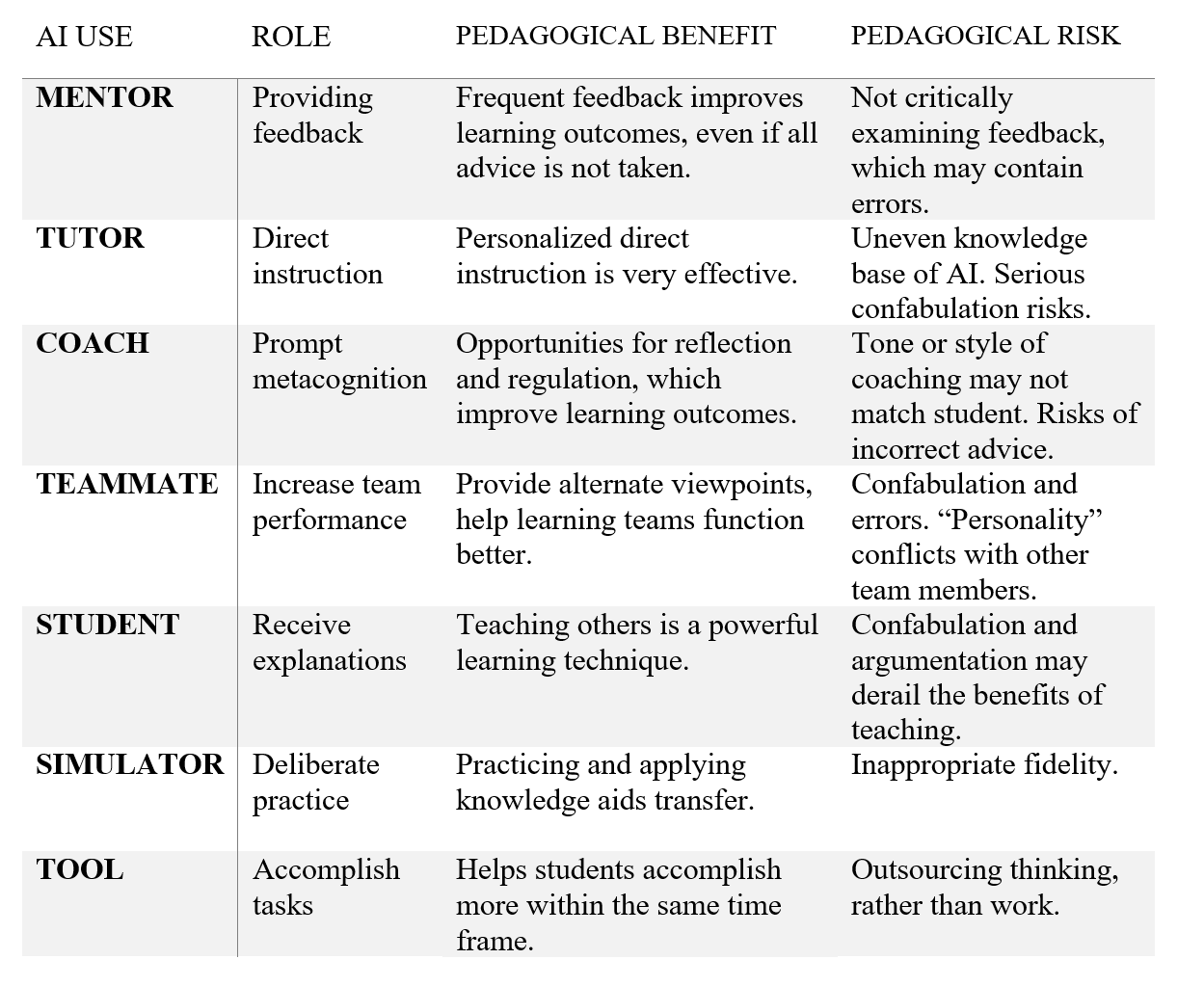
Precisely because ChatGPT makes mistakes and 'hallucinates', large language models (LLMs) can be used effectively in teaching with a little care. In their June 2013 paper, "Assigning AI: Seven Approaches for Students with Prompts" Mollick and Mollick propose seven different uses for ChatGPT (see diagram).
AI and exams
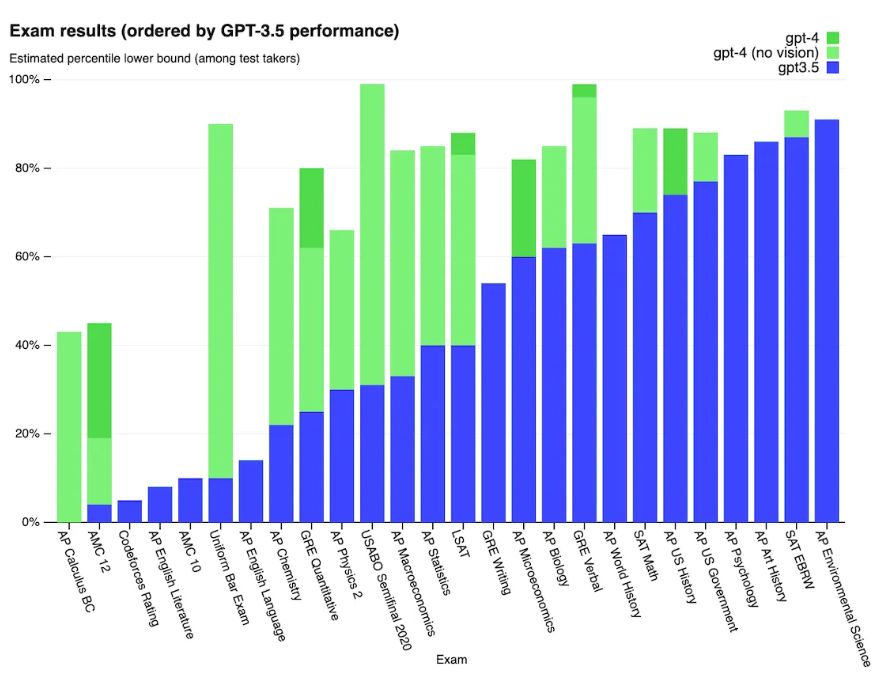
Several tests have since demonstrated the power of ChatGPT. The difference in performance between GPT-3 and GPT-4, , the latter of which was released for ChatGPT on 13 March 2023, is also significant (see chart above, source). This applies to examinations and all performance assessments in general:
Exams in remote mode no longer make sense. The above graph and our own tests suggest that exams can be passed using ChatGPT alone, with no learning effect. Personalisation based on personal experience and examples can also easily be simulated with ChatGPT.
Exams in face-to-face mode remain unchanged. Permitted aids are defined, and any excess is penalised. As before, an invigilator will check which tabs are open when laptops are used. Whether it is Wikipedia or ChatGPT, having an open tab with unauthorised sources is prohibited. The same applies to BYOD exams with OLAT.
Oral exams remain unchanged. Whether in person or via Zoom, it is clear when someone is using sources other than their own thoughts. It is irrelevant whether this is ChatGPT with audio-to-text conversion or someone standing in the room. This also applies to all kinds of presentations. If notes are permitted during the Zoom test, AI does not change this. The person being tested shares their entire screen via Zoom, thus providing insight into the notes they are using.
Written work must be scrutinised more closely. Since ChatGPT and similar tools can generate high-quality text, clear rules must be established. As before, original considerations are not declared, whereas adopted considerations are declared in a comprehensible manner. However, the use of AI must be discussed, and appropriate rules must be established (see the section entitled 'New declaration of independence?'). The trained and considered use of AI is recommended.
AI for research:
Well-known digital research tools include literature databases of all kinds. What is relatively new is the simultaneous evaluation of research results content, for example in the form of text summaries, links to other articles, or graphical representations of mutual references. This field is also in a state of flux, with new tools and functions constantly being added.
There is a very good overview video on research with AI, presenting the following research tools:
Research Rabbit: perhaps the most productive AI research tool, created by researchers for researchers without commercial interests. It provides a graphical representation of literature within a thematic network with adjustable parameters and is very user-friendly.
Literature Review: Provides a quick overview of a topic over a period of one year, five years or indefinitely. It creates one paragraph from each of ten articles, providing a brief summary in the style of a state-of-the-art review. This is a very good starting point for taking your first steps into a new subject area.
Elicit: A colloquial search (similar to ChatGPT) can be used to search for articles that appear in a table alongside AI-generated short summaries organised by criteria. This is very useful for gaining a quick overview of a large body of literature.
Litmaps: Starting from an article, Litmaps creates a visual representation of its connections with other articles. It indicates abstracts, references and citations. It is particularly useful for gaining an overview of previously overlooked research and for quickly delving deeper into a topic. Additional functions can be activated with an account.
Chatbots like GPT-4 have two main features: capability (what they can do) and behavior (how they act). While capabilities are established during an intensive pre-training phase, behavior can be adjusted in the subsequent, more frequent fine-tuning phase. After pre-training, the model essentially acts as an autocomplete tool. Its ability to interact in a chat-like manner comes from fine-tuning. (Source)
ChatGPT
Cost: Free or Premium version for $20/month.
Following its release on 30 November 2022, ChatGPT sparked a new wave of public interest in artificial intelligence research. ChatGPT has undergone significant development since then and is constantly being given new functions. In mid-March, the significantly more powerful GPT-4 model was released, although the previous GPT-3.5 model is still available for free.
A detailed study of over 100 possible applications of ChatGPT image recognition was published in October 2023. The Dawn of LLMs: Preliminary Explorations with GPT-4V(ision) (PDF)
An overview of the functions available in October 2023 can be found here:
Free version:
- Fast responses, but less sophisticated linguistically than GPT-4.
- Higher susceptibility to errors
- Custom instructions
Premium version:
- Stronger model with slower generated answers, but less error-prone and with better style. This model includes the 'Vision' function, which has been integrated since October 2023. See the linked paper above for more information.
- Browse with Bing: Search the internet with Bing and receive up-to-date answers.
- Advanced Data Analysis lets you upload and work with files such as Excel spreadsheets.
- Plugins: You can select plugins from external providers to significantly expand ChatGPT's functionality. For example, you can search for articles with real results and summarise the content (ScholarAI), search YouTube videos (Vox Script), or perform complex calculations and programming (Wolfram).
- Dall-E 3: Generate images via a text prompt within ChatGPT. Free open-source alternative: LLaVa
Premium version on Android and iOS:
- Voice function: ChatGPT can be used via voice input and responds via voice output. This means you can actually have a dialogue with ChatGPT without typing.
Google Gemini
Cost: Free or $20 per month.
Gemini is Google's LLM. Currently, it is considered to be less powerful than ChatGPT, but, like many other LLMs, it is improving in terms of its functionality. Bard has internet access and can therefore answer questions about current affairs.
Claude
Cost: free or premium for $20/month.
Claude is Anthropic's LLM and is considered ChatGPT's biggest competitor, with many reports suggesting that it is more powerful. Anthropic focuses on social and safe applications and conversations, and sees itself as an "AI safety and research company" [Source]. Anthropic has entered into a billion-dollar collaboration with Zoom and Amazon, among others, with the aim of creating the most powerful LLM in future. Claude is currently only available in the USA and the UK.
Meta Llama
Cost: free. Download and installation required.
Llama is Meta's LLM. Meta owns Facebook, WhatsApp and Instagram, among others. Llama 2 is currently (October 2023) the leading model. There is Llama 2, which is comparable to ChatGPT, and Code Llama, which was developed specifically for programming, particularly in Python.
There are now several notable image generators, and the available functions are being expanded every month. You can find a detailed comparison of the largest image generation programmes in the following YouTube video: Who is KING of AI IMAGES? An In-Depth Breakdown
You can see the results of this comparison from the video here:

Until now, the definition of plagiarism has been relatively clear. However, ChatGPT has now dissolved this clarity, making a new discussion about plagiarism and declarations of independence necessary. In July 2022, Prof. Dr. Doris Weßels proposed how AI support could be declared in academic papers in an article titled "University Teaching under the Influence of AI-supported writing". Of course, it is up to faculties and lecturers to decide on the specifics of implementation. Here are a few questions that could be discussed on the way to making a decision:
- To what extent should the use of AI-supported tools be specified? Is it sufficient to mention the tools used (e.g. ChatGPT, ResearchRabbit and Paper Digest)? Should the purpose of their use be stated (e.g. ChatGPT for the outline, abstract and title; ChatPDF for an in-depth discussion of the texts in chapters 3 to 5)? Or should the entire prompt history be submitted (e.g. in the appendix or as an additional PDF)?
- Should we discourage our students from using AI, as this could lead to important learning processes being outsourced? Or should we train our students in the scientific use of AI, encouraging its considered use in teaching and, potentially, in examinations?
- Should AI be allowed, but with the stipulation that no AI-generated text may be adopted without substantial revision? How can this be checked?
- AI will become an integral part of everyday life in the near future, just as indispensable to scientific work as literature databases (see Microsoft 365 Copilot). Does this mean that it is necessary to regulate the use of AI at all, or will this regulation merely be a medium-term transitional phenomenon?
Recommendations from a university didactics perspective:
- Train yourself and your students in the use of various types of AI.
- Consider which thinking tasks can sensibly be outsourced to AI, and which students must perform themselves to achieve the learning objectives.
- In the medium term, request information on which AI has been used. This is primarily an exercise in familiarising yourself with working with AI and the new working reality.
- Define which aids can be used in examinations and written assignments.
Principles for the use of AI (20 May 2025):
Brief input for the ATOL general meeting. The discussion will focus on the principles that should currently be applied in our work with AI to ensure efficiency, productivity and the preservation of our own ideas. PDF
How is AI changing the role of lecturers? (12/05/2025)
This was a lecture and conversation starter at the opening ceremony of the CAS in Higher Education Didactics. The argument is that the existing capabilities of AI and their foreseeable developments will lead to a significant change in the role of lecturers. PDF
Lecture: 'Writing with AI' (8 May 2025).
How can we use AI to write seminar papers for FS25? How should we proceed to avoid being dominated by the average output of an LLM? This lecture will demonstrate which tools can be used at each stage of the process. The focus will be on how our own ideas and thoughts control the entire process, ensuring that the end result is our own work. PDF
Info-Lunch: 'AI in Research' (12/12/2024).
How can AI support your day-to-day research? Gain practical insights into AI tools for different research phases. There will be a live demonstration of a CustomGPT for research applications, and you will have the opportunity to test it yourself. PDF
Info-Lunch: 'AI in Teaching' (28/11/2024)
Explore practical applications of AI in everyday teaching, from event planning to exam design. Enjoy a live demo of a CustomGPT designed specifically for teaching. PDF
Info-Lunch "AI in the University" (21.11.2024)
A compact overview of the latest developments in the AI landscape, focusing on the university sector. Discover the key findings from two recent conferences on the topic of 'AI and the university' and discuss their significance for our institution with us. PDF
Conference: Generative AI (31.01.2024)
Generative AI in teaching and learning processes: Potential for the further development of university teaching? Generative AI has arrived in society at large — and thus in university teaching too: students use ChatGPT and similar tools to shorten, improve, or even completely generate their written work, while lecturers are experimenting with ways to incorporate generative AI applications into their teaching to promote learning. So what potential does generative AI offer for the further development of university teaching? This conference, organised by Lucerne University of Teacher Education, the University of Lucerne, and Lucerne University of Applied Sciences and Arts, is aimed at teachers and teaching staff from the three institutions. The intention is to share experiences on the use of generative AI in teaching, to learn from each other and to jointly discuss questions raised by the use of generative AI in teaching. Conference programme
The event was jointly organised by Dr. Denis Hänzi (PH Luzern), Dr. Bernhard Lange (Zentrum für Hochschuldidaktik Luzern), Dr. David Loher (ZLLF Luzern), Douglas MacKevett (HSLU W) and Prof. Dr. Peter Tremp (Zentrum für Hochschuldidaktik Luzern).
Info-Lunch "ChatGPT with 'Superpowers' (22.11.2023)
This event will focus on the enhanced capabilities of the latest ChatGPT model, released on 6 November 2023. Particular emphasis will be placed on creating personalised GPT models for specific applications and generating PowerPoint presentations. The event aims to demonstrate the practical application of these new features in academic research and teaching, and enable participants to use these tools effectively in their work. PDF
Info-Lunch 'Image Generation with AI' (15/11/2023)
The latest text-to-image models demonstrate impressive capabilities in creating photorealistic images from text descriptions. They offer advanced customisation options and support complex image processing. This Info-Lunch will discuss possible applications of AI image generation and explore how these tools can be utilised in academic research and teaching at the University of Lucerne. PDF
Info-Lunch 'ChatGPT for Research' (27/09/23)
While ChatGPT is a useful tool, there are also other programmes specifically designed for research purposes, such as Elicit and ResearchRabbit. However, ChatGPT has also been improved and can be used with optimised prompts. PDF
Info lunch ‘What can ChatGPT do (now?)’ (20.09.23)
ChatGPT has gained several new features over the summer. Custom Instructions now also work for users of the free version, and the paid premium version allows users to utilise plugins and ‘Advanced Data Analysis’. In addition, ChatGPT now faces a variety of competition. PDF
Classification of artificial intelligence as a new teaching tool (February 2023).
AI has already brought about significant changes. ChatGPT and other AI tools can now take over many writing tasks, and the definitions of plagiarism are becoming less clear-cut. This opens up new possibilities for teaching. This video provides an overview, some of which was presented before the following events. This general information has been summarised in this video and removed from the recordings of the other events. To get an introduction to AI, start here: Video and PDF
ChatGPT for dissertationen (6.02.2023)
Writing changes with AI support. While it can generate raw text and provide ideas, it currently lacks the depth required for academic work. The video demonstrates its applications and limitations: Video and PDF
ChatGPT for exams (2.02.2023)
Exams are only partially changing: Exams in remote mode are no longer recommended, but exams in person remain almost unchanged. A new situation has emerged with regard to all kinds of written work, because ChatGPT can take over parts of it. Above all, it is important that lecturers and students learn how to use such AI technology. Students can use ChatGPT as a learning aid and lecturers can use it for planning. Video and PDF
ChatGPT for teaching (1.02.2023)
ChatGPT can have an interesting effect in the classroom. It can raise students' cognitive performance to a higher level in Bloom's taxonomy of learning. This deepens understanding and enables the application of new theories to other topics and critical thinking. ChatGPT can also be useful for planning your own teaching. Examples are shown in the video. Video and PDF
The first recommendation at the intersection of AI and academia is the work of Ethan Mollick. His blog, One Useful Thing, offers insights into various topics related to AI and universities. His other blog, More Useful Things offers numerous complex, proven prompts and other resources. His Newsletter is also highly recommended.
The webinar ChatGPT in der modernen Lehre with Prof. Dr. Doris Weßels (FH Kiel) offers a very good introduction to ChatGPT, including its technical background and use in teaching, as well as considerations for an updated declaration of independence in writing assignments.
The webinar series «AI or what the ChatGPT?»: This series comprises five webinars published between April and June 2023 on various aspects of AI in academic teaching.
Dr. Bryan Alexander has been providing a weekly online platform for discussions around academic teaching for years. This two-part video from December 2022 contains some very interesting contributions and is recommended: Part 1 and Part 2.
There is also an annotated and constantly updated list of links with comments and news on AI from both the Hochschulforum Digitalisierung and Dr. Bryan Alexander.
You can find a constantly updated list of AI-based programmes with a search function here: https://www.futuretools.io/


